Model Training
The Model training tab exposes the full MolCraftDiffusion training pipeline from the browser.
Extended task families
The unlock mechanism exists for future gated families. If the server sets MOLCRAFT_UNLOCK_PASSWORD (see Installation), an unlock field appears above the form — enter the password and click Unlock to obtain a session token ("Extended models unlocked" is shown on success). Currently every task family in the dropdown is already public, so unlocking has no visible effect on which families are offered.
Layout
| Column | Contents |
|---|---|
| Left (fixed 440 px) | Presets bar, YAML import, experiment metadata, collapsible parameter form |
| Right (remaining width) | Job history list |
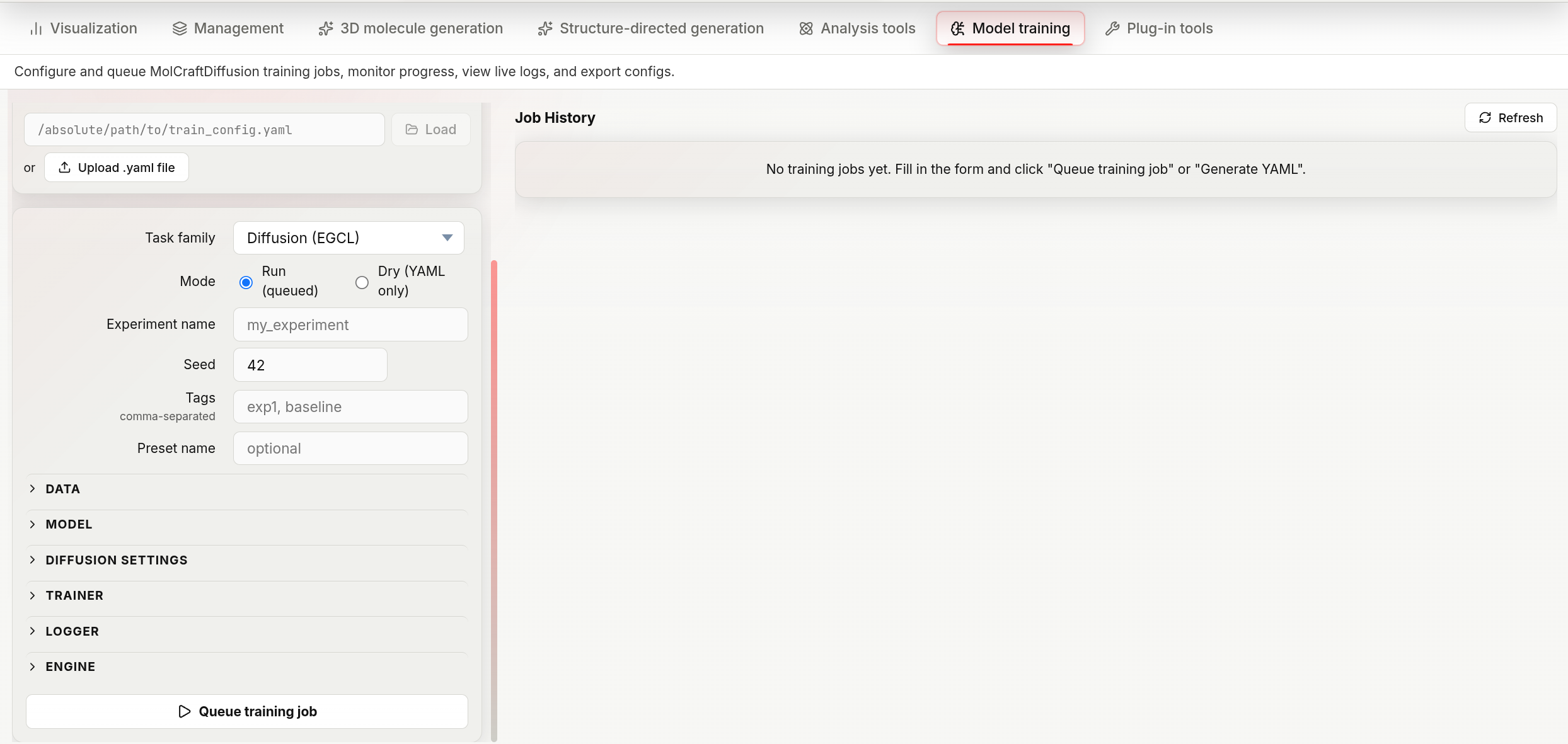
The Model training workspace: import or fill in a config on the left, queue the job, and track it in the Job History panel on the right.
YAML import
Rather than filling the form manually, you can import an existing training YAML:
From a file path — paste an absolute path into the text box and press Enter or click the arrow button. The backend reads the file and populates every form field.
From a file upload — click the upload button and select a .yaml or .yml file.
Both methods overwrite the current form state entirely. After import you can still edit individual fields before submitting.
Task family
The Task family dropdown lists every family from GET /training/task-families. Each family belongs to one of five categories, which controls which form sections appear below.
| Category | Families | Description |
|---|---|---|
diffusion |
Diffusion (EGCL), Diffusion (EGCL, pretrained defaults), Diffusion (EGT), Tabasco (Flow) | DDPM/flow-based 3D molecule generation |
regression |
Regression (EGCL), Regression (eSEN), Regression (EquiformerV2) | Supervised property predictor (used by CFG models for property steering) |
ssl3d |
SSL-3D (EGCL), SSL-3D (EGT), SSL-3D (eSEN), SSL-3D (Equiformer) | Self-supervised 3D pre-training (denoising + masking) |
vae |
VAE (Equiformer), VAE (Transformer) | Variational autoencoder for latent-space generation |
guidance |
Guidance (EGCL), Guidance (eSEN) | Guidance-model training |
Run mode
| Mode | Submit button | Effect |
|---|---|---|
| Run | Queue training job | Queues a real training job; the backend launches the training process and streams logs |
| Dry | Generate YAML | Generates and validates the YAML configuration only — no training runs. The YAML is shown inline with a Copy command button and a Download YAML button |
Use Dry to inspect or share the configuration before committing compute.
Form sections
Sections are collapsible (click the section title to toggle). Which sections appear depends on the task family.
| Section | Shown for |
|---|---|
| Data | all |
| Model | all |
| Diffusion settings | diffusion |
| Regression settings | regression |
| SSL-3D settings | ssl3d |
| VAE settings | vae |
| Trainer | all |
| Logger | all |
| Engine | all |
guidance families (Guidance (EGCL), Guidance (eSEN)) have no dedicated settings section — only Data, Model, Trainer, Logger, and Engine appear.
Experiment metadata
| Field | Default | Description |
|---|---|---|
| Experiment name | (required) | Label used for the output directory and logger run name |
| Seed | 42 | Global random seed for reproducibility |
Data
| Parameter | Default | Description |
|---|---|---|
| Dataset name | (required) | Cache key for the processed dataset |
| Data root | data/ |
Base directory the other data paths are resolved against |
| CSV path | (empty) | Path to the molecules CSV; leave blank if using ASE DB |
| XYZ directory | (empty) | Path to the XYZ geometry folder; required when CSV path is set and ASE DB path is empty |
| ASE DB path | (empty) | Path to an ASE .db file; overrides CSV path + XYZ directory when set |
| Atom vocabulary | H, B, C, N, O, F, Al, Si, P, S, Cl, As, Se, Br, I |
Comma-separated element symbols. Molecules containing unlisted elements are excluded unless Allow unknown is on |
| Batch size | 48 | Molecules per training step |
| Max atoms | 86 | Molecules with more atoms than this are excluded |
| Train ratio | 0.8 | Fraction used for training; the remainder becomes the validation set |
| With hydrogen | true | Include hydrogen atoms in the geometry |
| Use OHE feature | true | One-hot encode atom type as a feature vector |
| Allow unknown | false | Pass through molecules with elements outside the vocabulary (marked with a special unknown token) |
| Data-efficient collator | true | Use a variable-length batching strategy that reduces padding; improves GPU utilisation on diverse atom-count datasets |
Either CSV path or ASE DB path is required. If using CSV path without an ASE DB, XYZ directory is also required.
Model
| Parameter | Default | Description |
|---|---|---|
| Hidden size | 256 | Embedding dimension for all attention layers |
| Number of layers | 9 | Transformer depth |
| Number of sub-layers | 1 | Sub-layers per transformer block |
| Dropout | 0 | Dropout probability (0 = disabled) |
| Condition names | (empty) | Comma-separated property columns to condition on. Non-empty enables the conditioning options in Diffusion settings |
| Attention | true | Enable multi-head self-attention; set to false for a simpler MLP baseline |
| Tanh | true | Apply tanh activation in the output head to bound predicted noise |
| Load weights from | (empty) | Path to a checkpoint to initialize model weights from, for fine-tuning |
| Resume checkpoint | (empty) | Path to a checkpoint to resume a training run from (optimizer/scheduler state included) |
Diffusion settings
Applies to task families in the diffusion category: Diffusion (EGCL), Diffusion (EGCL, pretrained defaults), Diffusion (EGT), and Tabasco (Flow).
| Parameter | Default | Description |
|---|---|---|
| Diffusion steps | 500 | Total forward-process steps T |
| Noise schedule | polynomial_2 |
Variance schedule shape: polynomial_2, cosine_x, issnr_1_2, or learned |
| Loss type | vlb |
Training objective: vlb (variational lower bound) or l2 |
| CFG mask rate | 0 | Fraction of property context randomly masked during training — enables CFG at inference. Set > 0 to train a conditional model |
| Mask value | 5 | Sentinel value substituted for masked/dropped context entries |
| Normalize factors | 1.0, 4.0, 10.0 |
Per-channel scaling applied to atom coordinates, atom types, and charges before diffusion |
| Val samples (n_samples) | 48 | Molecules generated per validation generative analysis run |
| Generative analysis | true | Run a sample-quality evaluation at each validation step |
| Use PoseBuster | true | Include PoseBuster validity metrics in the generative analysis |
Shown only when Condition names (Model section) is non-empty:
| Parameter | Default | Description |
|---|---|---|
| Normalize condition | value, N=10 |
Property normalization: none, value (divide by N), maxmin, or mad |
| Adapter conditions | (empty) | Comma-separated subset of condition names to route through the adapter module |
| Use adapter module | false | Route conditioning through a learnable adapter instead of feature concatenation (see below) |
Also shown, independent of conditioning: Deploy SP regularizer toggles the self-paced regularizer subsection below.
Conditional training (CFG)
Setting CFG mask rate > 0 trains a conditional model compatible with classifier-free guidance (CFG) at inference. During each training step, the property label is randomly dropped with this probability; the model learns both the conditional (φ(z, t, y)) and unconditional (φ(z, t)) denoising distributions in one pass. At inference, the two predictions are combined as:
where w is the CFG scale set at generation time. Typical values for CFG mask rate are 0.1–0.3.
Property normalization (the Normalize condition field above) affects how strongly the conditioning signal contributes to the denoising function and consequently how well CFG guidance transfers to generated structures:
value— divide the raw property value by a constant N. Simple but sensitive to the chosen scale.maxmin— rescale to [-1, 1] using the training set's min/max.mad— scale property values by the median absolute deviation of the training set. More robust across different property ranges and has been shown to retain a higher structural validity rate at strong CFG scales compared to fixed scaling.none— use the raw property value unmodified.
Choose the normalization scheme consistently across the generative and regression (property-predictor) models for a given experiment.
Conditioning mechanism — MolCraftDiffusion supports two ways to inject the property signal into the denoising network, selected by the Use adapter module checkbox:
| Mechanism | How it works | Notes |
|---|---|---|
| Feature concatenation (Concat.) — default (Use adapter module off) | The property label y is appended directly to the molecular representation before each denoising step: z = [x, h, y]. |
The conditional variable becomes part of the main noise-prediction input, giving it a stronger gradient during fine-tuning. Generally effective for CFG-guided generation. |
| Adapter — Use adapter module on | A learnable MLP maps y into the hidden feature space of each EGNN block and adds this contribution only when the property context is present. Adapter conditions selects which condition names go through this path. |
Attaches the conditioning pathway to an already-trained denoising network; may receive weaker corrective gradients during fine-tuning. |
Self-paced (SP) regularizer
A curriculum-learning loss regularizer: per-molecule losses above a threshold are down-weighted or dropped, and the threshold grows over training so harder examples are phased in gradually. Enable with Deploy SP regularizer; the fields below then appear.
| Parameter | Default | Description |
|---|---|---|
| SP regularizer | hard |
Weighting scheme: hard, soft, or polynomial |
| SP lambda | 0 | Initial loss threshold |
| SP lambda 2 | 1000 | Initial threshold for the secondary term |
| SP lambda update value | 1 | Amount added to both lambdas at each update step |
| SP lambda update step | 100 | Training steps between lambda updates |
| SP polynomial p | 1.1 | Exponent used by the polynomial regularizer |
| SP warm-up steps | 100 | Training steps before the regularizer starts applying |
Flow-matching parameters
Form fields for flow-matching-specific parameters (minimum ODE time, integration timesteps, self-conditioning, velocity parameterization) exist in the underlying code but are not currently surfaced by any task family in the dropdown, including Tabasco (Flow) — that family uses the diffusion settings above.
Regression settings
Applies to task families in the regression category: Regression (EGCL), Regression (eSEN), Regression (EquiformerV2). Trains a property predictor head on top of the molecular encoder, used later for CFG property steering.
| Parameter | Default | Description |
|---|---|---|
| Target columns | (required) | Comma-separated property columns to predict |
| Loss criterion | mse |
Loss function: mse or mae |
| Metrics | mae |
Comma-separated validation metrics |
| MLP layers | 3 | Depth of the property prediction head |
| MLP norm | batchnorm |
Normalisation inside the MLP: batchnorm, layernorm, or none |
| MLP dropout | 0.2 | Dropout in the prediction head |
| Normalize targets | true | Standardise property targets to zero mean and unit variance before training |
SSL-3D settings
Applies to task families in the ssl3d category: SSL-3D (EGCL), SSL-3D (EGT), SSL-3D (eSEN), SSL-3D (Equiformer). Combines 3D coordinate denoising with masked atom-type prediction as a pre-training objective.
| Parameter | Default | Description |
|---|---|---|
| Denoise weight | 1 | Loss weight for the coordinate denoising term |
| Atom mask rate | 0.15 | Fraction of atoms whose type is masked and predicted |
| Atom type weight | 0.5 | Loss weight for the masked atom-type prediction term |
| Sigma min | 0.01 Å | Minimum noise standard deviation added to coordinates |
| Sigma max | 2.0 Å | Maximum noise standard deviation |
| Sigma schedule | uniform |
Distribution for sampling sigma: uniform or log_uniform |
VAE settings
Applies to task families in the vae category: VAE (Equiformer), VAE (Transformer). Trains a variational autoencoder that encodes molecules into a continuous latent space.
| Parameter | Default | Description |
|---|---|---|
| Latent dim | 8 | Dimensionality of the VAE latent vector |
| Augment noise | 0.1 | Standard deviation of Gaussian noise added to coordinates during training augmentation |
| Augment rotation | true | Apply random 3D rotations to each molecule during training |
Trainer
| Parameter | Default | Description |
|---|---|---|
| Optimizer | adamw |
adamw, adam, amsgrad, or radam |
| Learning rate | 0.0002 | Initial LR |
| Weight decay | 1e-12 | L2 regularisation coefficient |
| Num epochs | 200 | Total training epochs. Leave blank to train by step count instead (see Num steps) |
| Num steps | (empty) | Total training steps; overrides Num epochs when set |
| Scheduler | cosineannealing |
LR schedule: cosineannealing, reducelronplateau, steplr, onecyclelr, or exponentiallr |
| Validation interval | 3 | Epochs between validation runs |
| EMA decay | 0.9999 | Exponential moving average decay for model weights — EMA weights are used at inference |
| Precision | 32 | Floating-point precision: 32 (FP32), 16 (FP16), or bf16 |
| Save top-k | 3 | Number of best checkpoints to keep |
| Save every val epoch | false | Also save a checkpoint at every validation epoch, not only on improvement |
| Gradient clip mode | norm |
norm (clip gradient norm) or value (clip element-wise) |
| Initial grad norm | 3000 | Target gradient norm for the first step, used to initialise the gradient scaler |
| Monitor metric | (empty) | Metric name to track for best-checkpoint selection, e.g. gen/Validity |
| Monitor mode | max |
Whether to keep checkpoints with the highest (max) or lowest (min) monitored metric |
Logger
| Parameter | Default | Description |
|---|---|---|
| Logger backend | logging |
logging (console/file) or wandb (Weights & Biases) |
| Log interval | 2 | Steps between log writes |
| W&B run name | MolecularDiffusion |
Shown only when backend = wandb. Overrides the auto-generated run name |
| W&B project | MolecularDiffusion |
Shown only when backend = wandb. W&B project name |
| W&B tags | (empty) | Shown only when backend = wandb. Comma-separated tags for the run |
Engine
| Parameter | Default | Description |
|---|---|---|
| Engine type | original |
original (custom training loop) or lightning (PyTorch Lightning) |
| Number of workers | 2 | DataLoader worker processes for prefetching. Only shown, and only applied, when Engine type = lightning |
Dry mode output
After clicking Generate YAML, the rendered configuration appears in a read-only text area below the form. Two buttons are shown:
- Copy command — copies a ready-to-run shell command (
MolCraftDiff train --config <path>) to the clipboard. - Download YAML — saves the configuration as a
.yamlfile.
Job history
Every submitted job — Run and Dry alike — appears in the right column, including the inline result from Generate YAML. Each row shows the task family (and preset name, if set) and a status badge (queued / running / completed / failed / cancelled / dry).
Click a row to expand it. Three sub-tabs are available:
| Sub-tab | Contents |
|---|---|
| LOG | Live-tailing training log. Updates every 3 seconds while the job is running |
| YAML | The full training configuration used for this job |
| INFO | Job metadata (ID, status, mode, task family, timestamps, config path, output directory, return code, error) and a suggested launch command with a Copy button |
Actions
| Action | When available | What it does |
|---|---|---|
| Stop | Queued or running jobs | Cancels a queued job before it starts, or sends SIGTERM to an already-running training process |
| Clone to form | Any job | Copies this job's configuration back into the form for re-use or editing |
| Download YAML | Any job with a stored config | Saves this job's YAML configuration |
| Refresh | Queued or running jobs | Manually reloads this job's status and log (also happens automatically every 2s while any job is active) |
| Delete | Any job, including running ones | Removes the job record from history (training output files on disk are not deleted). Deleting a running job does not stop the training process — use Stop first |
Configuration presets
The presets bar above the form works identically to the generation presets — see Presets. Presets save the full form state and restore it in one click.